Samsung Galaxy has introduced the new Samsung Galaxy Note 2 (Note II) into the market. Many of the Samsung products of smartphone are on Galaxy. Samsung Galaxy Note 2 is the upgraded version of Samsung Galaxy Note. Samsung Galaxy Note II has got many more features than its previous version. This device is running on Android 4.1 (Jelly Bean) platform. 1.6 GHz quad-core processor ensure multitasking without interruption.
Samsung company has launched the new super-sized Samsung Galaxy Note 10.1 smartphone into the market. It is expected to hit the markets and the latest salvo in its battle with Apple for the multi-billion-dollar handheld market. Samsung Galaxy Note 10.1 has got many special features compared to the previous Note. It is running on Google's Android 4.0 (Ice Cream Sandwich) operating system. It has 10.1-inch (Jumbo size) touchscreen which is considerably wider than the previous Note (5.3-inch touchscreen).
Facebook, the most popular social networking site and it has captured the young minds and also the best medium for communication. Of course, There are a lot to say about Facebook. Due to its popularity most of the countries are using Facebook in order to transfer their ideas and for communication. As it is available in all countries it provides in different languages.
Now we are living in the world of hackers and online robbers. It is not safe to play more on Internet. At any moment our Email passwords may also get hacked, its not a newness to us. After robbing our money or receiving spam mails we realize that our account has been hacked.
-->
Samsung company has introduced the new Samsung Galaxy Beam into the market. It is running on Android 2.3 (Gingerbread) platform. The thing is that it contains a mini projector which is quite unique from other phones.
know that Facebook is the second popular site in the world. Day by day Facebook upgrade it's looks and introduces new apps into it. Within few days Facebook Timeline has made popularity among the Facebook users including me.
Facebook timeline appears different as that of its ordinary look. It contain a profile picture and a Facebook timeline cover picture. It really looks beautiful as that of it's old look. Once you have activated Timeline, you will never avoid it.
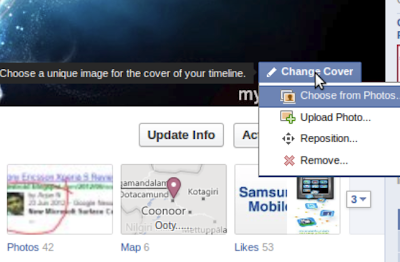
When I was browsing on Facebook one of my friend put a question to me that "How to change or add Facebook Timline cover picture?"
So I thought there will be some like him who don't no to change timeline cover picture. So I decided to write an article on it. How to change or add Facebook Timline cover picture?
Log into your Facebook Profile.
Select your profile by clicking on your photo.
Keep your mouse pointer on the Facebook Timline cover picture.
At the bottom right corner you can see "Change Cover".
Click on it, menu will drag down.
Click on upload photo and browse your photo.
After uploading position it using your mouse pointer.